No configuration rabbit holes. Get up and running in under two minutes.
01
Connect your calendar
Sign in with Google, Outlook.com (365, Hotmail, Live, MSN), or your local Apple or Outlook Desktop calendar. Aligrio reads your events securely, and nothing leaves your device.
02
Keep an eye on events
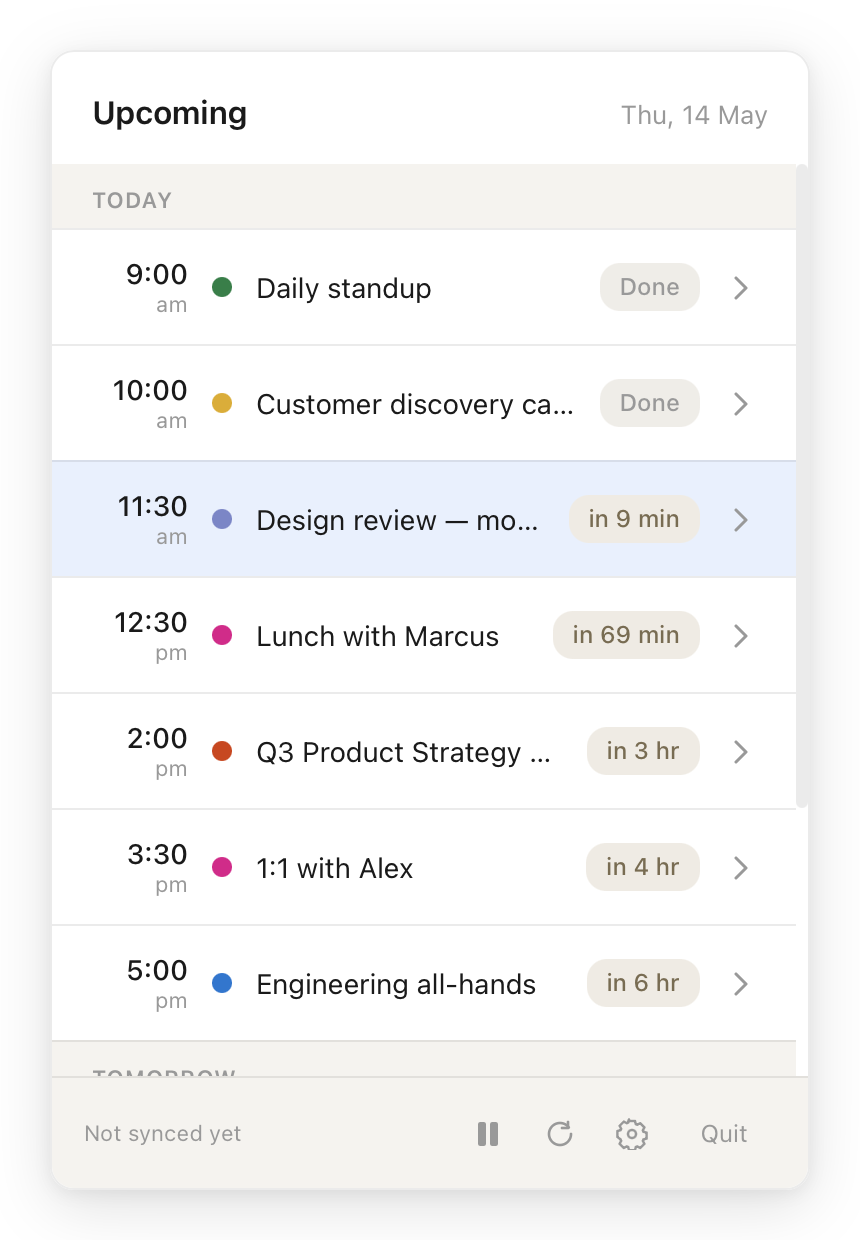
Our compact widget shows exactly how long until your next meeting. No hunting through tabs or apps.
03
Unmissable notifications
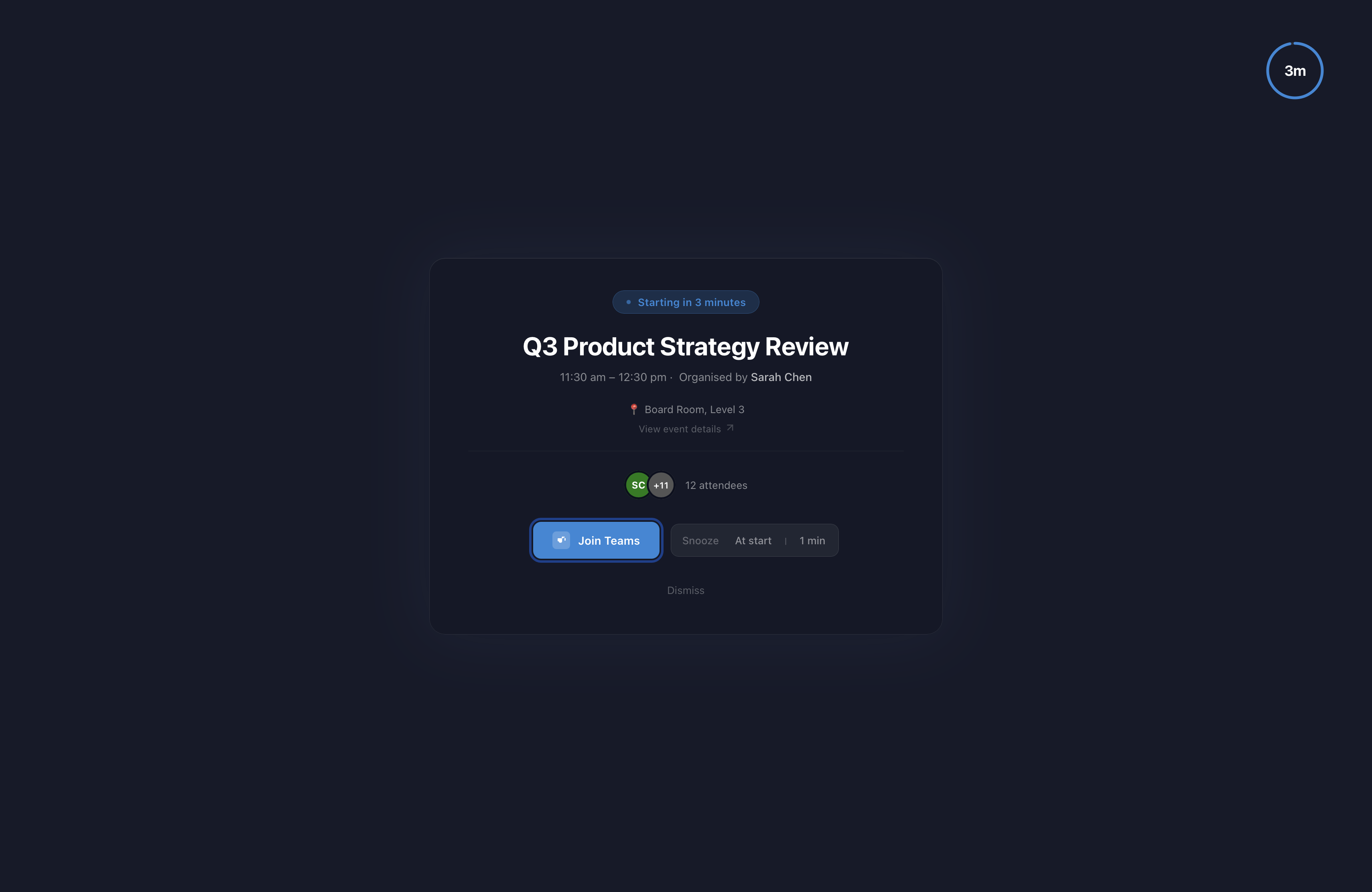
When a meeting is approaching, a calm full-screen overlay surfaces it, with all the detail you need to join or prepare.
Features
Everything you need, nothing you don't
Aligrio stays out of your way until you need it.
Menubar countdown
A persistent widget in your menubar shows exactly how many minutes until your next event. Glanceable, always there.
Full-screen overlay
When a meeting is approaching, our overlay fills your screen with the event details, join link, and a snooze option. Making sure you never miss your next meeting.
Snooze controls
Not ready? Snooze in 1, 5 or 10-minute increments. Aligrio will remind you again so nothing slips by.
Private by design
Your calendar data never leaves your device. Aligrio reads events locally: no account, no server, no tracking.
Works with the tools you already use
Connect to Google Calendar, Microsoft, Outlook, Apple Calendar, or all at once. Aligrio merges your calendars into one clear timeline.
Google CalendarOutlook OnlineOutlook DesktopApple CalendarMultiple accounts
Calendar providers
Plug into your existing setup
Aligrio works with the calendar you already rely on, or all of them at once.
Google Calendar
WindowsmacOS
Outlook Online
WindowsmacOS
Outlook Desktop
Windows
Apple Calendar
macOS
Download
Get Aligrio for your platform
30-day free trial. No account required, and no subscriptions.
Prices in Australian dollars. One licence provides usage for one computer.
FAQ
Frequently asked questions
Aligrio runs on your macOS or Windows computer and helps you stay on top of your
schedule. It keeps your next event visible, and gives you a full-screen notification when
your meeting is about to start.
It's especially useful if you have ADHD, autism, or just generally struggle with time management.
Anything where a calendar that's tucked away in another window isn't enough.
Aligrio currently supports the following calendars:
Google Calendar
Outlook.com, Hotmail & Live accounts
Classic Outlook for Windows (desktop app, Windows 10 and later)
Microsoft 365 (work and school accounts)
For Google Calendar and Microsoft Accounts, Aligrio connects through OAuth. Our integrations
are reviewed by Google & Microsoft, and we only request the permissions needed to read your
upcoming events.
For classic Outlook for Windows, we connect through the local Outlook app on your machine. No
cloud connection involved.
In every case, your calendar data is read and stored only on your computer. Nothing is sent
to our servers.
Yes. You can connect multiple accounts at once. For example, a work Microsoft 365 account,
alongside a personal Google Calendar.
Aligrio merges events from every connected calendar into a single timeline so your next event
is always your next event, regardless of which calendar it's on.
Aligrio detects video links in your event details and turns them into a one-click Join
button. It works with Zoom, Microsoft Teams, Google Meet,
Webex, FaceTime, and around a dozen others including GoTo, Jitsi, Whereby,
Skype, RingCentral, BlueJeans and Chime.
If your company runs links through a protection service like Microsoft
Safe Links, Mimecast, Proofpoint URL Defense, or FireEye, Aligrio unwraps
them automatically, so the Join button still goes straight to the meeting.
Everything. The trial is the full app: no lockeed features, no watermarks, no account, no
credit card. Use it for 30 days and decide if it's worth keeping.
At the end of 30 days, you'll be prompted to buy a licence (A$10, one-time). Until you do,
Aligrio stops showing reminders, but your settings, connected calendars & event list stays put,
so if you decide to come back later, you're not starting from scratch.
When your trial ends (or any time before), Aligrio will prompt you to buy a
licence. Payment is handled by Lemon Squeezy
and supports cards, PayPal, Apple Pay and Google Pay.
We don't offer refunds, that's what the 30-day trial is for. Use the full
app for a month, and only pay if it improves your time management.
Aligrio is free for 30 days. The full app, no credit card, no locked features.
After that, A$10 unlocks it permanently. The licence is per device, so one purchase
covers one install on either macOS or Windows. If you switch computers later,
you can deactivate the licence and move it across.
Your licence and the app on your machine keep working. There's no licence server to phone home to.
The caveat: if Google or Microsoft change how their calendar APIs work and we're not around
to update Aligrio, those connections could eventually stop syncing. However, your local Outlook
and Apple Calendar integration would keep working regardless.
We're committed to Aligrio for the long haul, but we'd rather tell you the
real picture than promise something we can't guarantee.
Nowhere, really. Your calendar events are read and stored only on your own
computer. Aligrio doesn't run any servers that handle your calendar data,
so there's nothing to leak, breach, or sell.
Support
We're here to help
Questions, feedback, or something not working? Reach out.
Send a message
We aim to respond within one business day.
✓ Message sent! We'll be in touch soon.
Something went wrong. Please try again or email us directly.